Translate

Showing posts with label iOS app. Show all posts

Friday, January 8, 2016

What is my face shape?

Have you ever had a question "What is my face shape"? Here is the answer...
Face Shape Meter, a simple and easy tool for identifying your face shape from your picture, has been recently published on the App Store

This app will help you to find out your face shape quickly, without using any additional measurement tools and techniques.

Knowing your face shape can be useful in many different areas. For example, you would need to know your shape of face for finding “the right” haircut or hairstyle, sun glasses that fit you well, the best makeup for your face, or even wig or hat that suits you best.
How it works: 

  1. make or upload picture
  2. outline / measure your face with special contour as shown on screenshots
  3. press Show Face Shape button and see the result


Tips:
  • For best result use a picture with neutral face expression, where your head is directed straight to the camera. Turning your head might affect the final result.
  • Before measurements make sure your hairline is visible


Saturday, October 17, 2015

SolarMeter - solar photovoltaic planner and analyzer available on Android and iOS

The first version of SolarMeter app for iPhone and iPad users is available on the App Store now. The similar application is also available for Android devices from Google Play

The application helps people, interested in using free source of energy  - sunlight, to check solar potential of their roof or land, how much solar power is available at specific location throughout the year, to estimate how much energy a photo-voltaic system is able to produce per month or year.

The app also offers area converter, that supports many different units,  and contains tips on how to estimate roof area using map and Planimeter app.
Simple "Costs Calculator" allows users to compare changes in energy bills with and without using solar cell panels.

iOS version features: 
  • Real-time solar power calculation based on current location, panel/device orientation and panel/device tilt**
  • Solar Power and Energy calculation for different periods of time: day, month, year 
  • Ideal (calculated) and experimental statistical solar data (offline) available 
  • Sensor based inputs for orientation and tilt 
  • Current location search using GPS and Network
  • Graph/Plot 2D data presentation 
  • Solar panel efficiency control 
  • Bill and Saving estimation based on user input (energy monthly or annual consumption). 
  • Roof tilt angle measurement 
  • Roof area calculation based on Planimeter* measurements 
  • Metric and Imperial units 
* the app has to installed to be able to use it for measurements.
** Make sure your Time Zone settings are correct and you use it in portrait orientation.


SolarMeter on iOS

If you have questions about the app or have improvement suggestions, we will be glad to hear from you in the comments below or by e-mail.


Go Green!


SolarMeter Android app on Google Play

Monday, March 23, 2015

[iOS] Millimeter Pro - screen ruler v1.1.7: Manual Input and Circle Measurements added.

Millimeter - screen ruler  has been recently updated with new features and improvements.  

Manual input

Now you are able to set manually: 
    - exact width and height in Ruler Mode
    - exact radius and number of parts in Circle Mode
    - exact length and number of parts to split in Parts Mode


How it works:

- touch Results View (in any mode) at the lower left corner of the screen to call     input dialog

How to call manual input dialog
- enter values and press Done

Manual Input in Ruler Mode

Circle Mode

Now you can measure circle radius diameter and area in Circle mode. Touch and Move at any point of the screen to adjust slowly radius of the circle.


Circle Measurement

You will find the same features in Android version of the app as well.


Millimeter Pro Android app on Google Play

Friday, July 25, 2014

Planimeter - GPS Area Measure for iOS. How to manage files. Save and Open previously saved measurements.

This video demonstrates how to  manage your measurements using Save and Open features in recently released Planimeter - GPS Area Measure app on iOS.

This functionality is very useful not only for saving your area and distance measurements but also can be very handy for storing your favorite locations to visit later again or to map an initial spot you want come back to (e.g. to find your car, property, house, park, tent, tree, etc.)


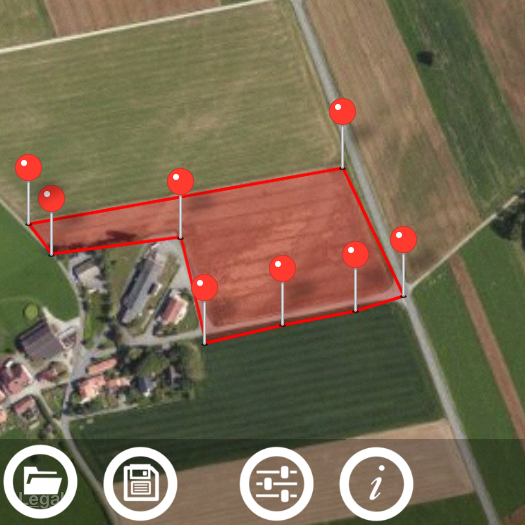
Planimeter - GPS Area Measure is our mobile application for different land measurements on maps using Geo-coordinates, Satellite view with manual touch or GPS tracking. The app can be applied in such areas as farming, road building and repairing, construction and planning, solar panel installation, real estate business, hiking and travel and many others.

Planimeter Android app on Google Play

Wednesday, July 23, 2014

Circle Measurement Mode in Partometer App on iOS. (video)


In this video we want to show you how o measure radius, length and area of a circle and find its center using the Circle Measurement Mode in Partometer App on iOS. Distinctive feature of the mode that it's possible to measure a partially visible circle.

Partometer is a camera tool for measurements on pictures / photos. The app is  available on both platforms iOS and Android.


Partometer Android app on Google Play

Tuesday, July 22, 2014

Pupil Distance Measure for iOS. Important tips and update. How to measure pupillary distance properly.

New update v1.0.3 for the iOS version of Pupil Distance Meter has been released.
We have made some improvements to the measurement process and also included important information on the screen during the measurement procedure. It should help to understand key point for the successful and accurate measurements.

The info button at the upper right corner of the screen provides content-dependent info / help. It means the information shown on touch is related to the current measurement step or state of the app. Thus you can see help tips at each step of the measurement procedure.


The basic and main app states are:
- taking two SUCCESSIVE pictures of a face with a reference (e.g. credit card) automatically during one session. 3 sec interval allowed  to move the camera from the face to fit a new pattern scale.
- marking pupils and reference bounds with the screen rulers on BOTH (!) images
- rulers alignment confirmation using switch at the right bottom corner (have to be done for BOTH pictures)

ONLY after the rulers are properly aligned and confirmed for BOTH pictures - the actual measurement results are shown at the top of screen.

Although all important key points are mentioned in the video


we still see that some users have difficulties with understanding  the measurement procedure and it causes improper results.

The accurate results can be achieved ONLY  if you:
- follow the instruction thoroughly (see video)
- make accurate ruler alignment
- DO NOT MOVE OR TILT OR SHIFT YOUR HEAD AND  REFERENCE (!)  while taking two successive picture. It is VERY important that pictures are taken for the same head and card position (!).  ONLY PART YOU CAN MOVE  between taking 1st and 2nd pictures is YOUR DEVICE.

We hope this info can help you to understand the measurement procedure better and improve your experience with the Pupil Distance Meter app  that is designed to provide accurate PD measurement.

If you have questions or suggestions please contact support@vistechprojects.com, we will be glad to help you.

Friday, July 18, 2014

Circle Measurements on photos using Partometer App for iOS.

New Circle Mode has been added to Partometer app on iOS with the update v1.2.0. 

Circle Radius, Length and Area can be measured using the new mode. 

Special 3-point ruler allows users to mark and measure even partially visible circles. Also it  helps to find the center of a circle.