Translate

Showing posts with label android apps. Show all posts

Saturday, April 23, 2016

[Android] Free "Millimeter - screen ruler": performance and design improved, options to buy new modes and features.

Free "Millimeter - screen ruler" app has been updated with performance improvements, design changes and fixes.  Now app works faster on all devices and offers customization options right from the free version of the app. You can download version 2.0.4 from Google Play now.


Free functionality has been extended with full screen mode and standard view rulers on top edge of the device and on left vertical ruler in the full screen  mode.

Full screen mode in Millimeter

Also in the free version of the app you can:

  • Calibrate Millimeter with custom or standard objects (credit or ID card, coins, etc)
  •  Use Ruler Mode for length measurements in metric and imperial units: mm and inch
  • Use fractions for inch units
  • Read interactive Help / Guide about all available features in a mode
  • Use app as a standard ruler
  • Use full screen mode for better user experience in Ruler mode


If you need extra functionality you can customize your version of the app with paid features.
Full version of the app will allows you to do the following:

  • Height measurements with extra rulers in 2D 
  • Area measurement of a rectangular object with 2D option
  • Calculate W/H ratio of a rectangular objects in 2D
  • Split length of an object into equal pieces in Parts Mode
  • Measure Thread per inch ( TPI ) measurement pattern  

  • Mesure circular objects in Circle Mode
  • Split circle into equal sector / angle
  • Lock / Unlock rulers in any mode for better usability 
  • Set exact size, length, diameter, number of parts manually with keyboard input
  • Change background to B/W night mode for power saving (πŸ”‹) and better visualization

☎ If you have comments, suggestions or requests, please contact support@vistechprojects.com. Thank you!

Millimeter Android app on Google Play

Saturday, March 26, 2016

What is my face shape? Face Shape Meter app released for Android.


Face Shape Meter, a simple and easy tool for detecting your face shape from a picture, has been released on Android OS and available on Google Play.

This app will help you to find out your face shape quickly, without using any additional measurement tools and techniques. 


In the app you have options to take picture with front/rear camera or upload face picture from a gallery. For accurate contour adjustment you can zoom in picture as shown on the screenshot above. 

Zooming and dragging of the face contour, and also Undo/Redo and Reset actions make face outlining easy and quick. Also you have an option to share a screenshot with your face shape result.

The app released as  free app with ability to upgrade to full version. In the free version you will be able to run and test the app on your device, work with face contour, see help. 

★ You can get time limited access to the full version, if you use our promotional offer available in the app.

How it works: 
  1. make or upload picture 
  2. outline / measure your face with special contour as shown below 
  3. press Show Face Shape button in the middle and see the result

Also see Help in the app for other details and app control description.


Tips: 
For best result use a picture with neutral face expression, where your head is directed straight to the camera. Turning your head might affect the final result. Before measurements make sure your hairline is visible.

Thank you for your interest in our apps and please feel free to contact us with any questions or suggestions.


SolarMeter Android app on Google Play

Thursday, July 9, 2015

[Android] New "Distance and Bearing" feature in Planimeter v4.3 - adding points on the map via length and angle inputs.

Distance and Bearing dialog
Planimeter v4.3.0 for Android introduces new way of adding points to Google Maps for measurements. 

Planimeter users have been asking for an option to add points via length and angle inputs (like in Autocad). Now this feature is available from location provider list (green button) under "Distance & Brg".

With this feature you can quickly lay out any shape on the map with exact dimensions and orientation; measure regular polygons on a map surface with couple clicks.


How it works: 

- select "Distance & Brg" using green button

- add start point,  otherwise last point will be used as a start point

- make a SHORT /  LONG touch on "My location" button to call input dialog

- enter exact distance and angle / bearing

- CHECK, if you want to use relative angle (calculated  from the direction to the last point, opposite to the direction to the North.

- use +/- buttons to add or remove points 


Please watch the video below that demonstrates key moments of using the new feature:


We are looking forward to your feedback, comments and suggestions.
Planimeter Android app on Google Play

Monday, March 2, 2015

Planimeter on Android: Interactive Guide has been introduced in v3.8.9.

Planimeter on Android has been updated with new Interactive Guide that contains short description of main  app features and controls.

How it works: 
- open Help from option menu 
- swipe right or left to cycle through the guide in any direction

OR 

- touch any control on the screen to see its description and continue moving through the guide from this point


Let us know if you find the new guide helpful or if you have any questions regarding the app.

Planimeter Android app on Google Play

Wednesday, January 21, 2015

Planimeter on Android: improved UI with new drawer menu.


Improved option menu with sliding drawer
Drawer Menu
Our Android app for GPS tracking and distance/area measurements on Google Maps, Planimeter, has been updated with improvements to option menu. As been mentioned before some users had problems finding option menu on Samsung devices. Now this problem has been resolved with drawer menu that can be reached as before by touching menu button or by swiping from the left edge of the screen.

Version 3.8.4 is available on Google Play.

Thursday, November 20, 2014

MapTrack - real time GPS tracking. How to call option menu and turn sound off.


Option Menu in MapTrack app contains option to turn sound off. You can call Option Menu using a dedicated button on your device or using a virtual button as shown under #1 on the picture (Nexus 5, KitKat 4.4).

Some Samsung devices have different procedure to call the Option Menu. See our post with  more details about it: http://goo.gl/4FMuvq

Tuesday, September 2, 2014

Partometer - your camera tape measure. Calibrate once, measure as many as you want.


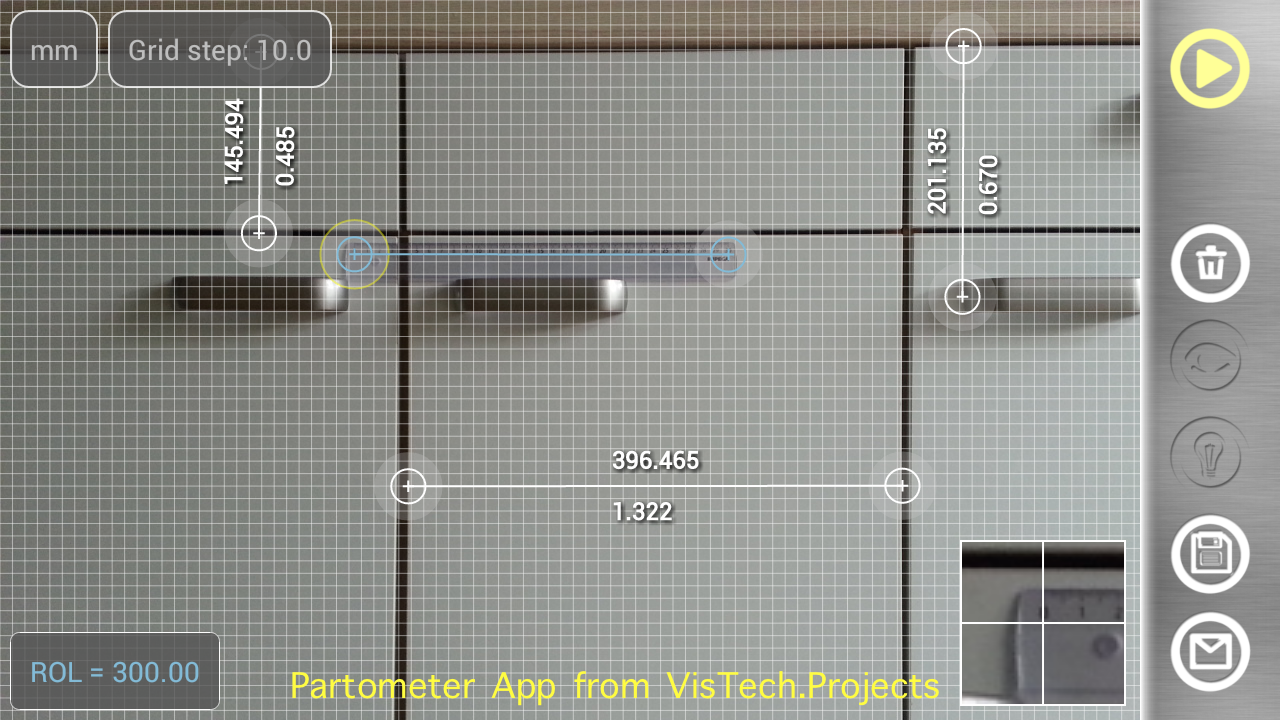
Once calibrated using known object, Partometer App   allows you to do multiple measurements in the plane. Measurement plane has to be parallel to the camera. Measurement results can be shown in different units along with relative (to a reference) values. It helps to divide the object in certain ratio. If an object doesn’t fit into camera view you can take a picture from a side and use Partometer3D App that extends functionality of Partometer to any defined plane in 3D.

Partometer Android app on Google Play