Translate

Showing posts with label Google Play. Show all posts

Tuesday, July 17, 2018

Planimetro su Android: tradotto in italiano.

Android version of Planimeter, app for distance and area measurement on Google Maps, is quite popular in Italy and we've had many requests about Italian language support. We glad to implement it in the app and new version is already available on Google Play.

Enjoy the app in your native language and let us know if you have any comments or suggestions.

If you want to see the app in other languages and willing to help, please contact us.


Planimeter Android app on Google Play

Tuesday, August 15, 2017

Millimeter Pro reached top of the charts on Google Play

After the recent sale on Google Play Millimeter Pro hit the top charts in many markets worldwide. The app has been ranked top 10 on Google Play in Overall and Productivity categories.

Millimeter Pro. Top paid chart in Productivity (US)

Millimeter Pro in top charts on on Google Play(AppAnnie)

We deeply appreciate all the positive feedback and support from the app users. The app appeared to be one of the best screen rulers on the market now in terms of  rating and user satisfaction.
 
If you have comments, suggestions or requests, please contact us.

Get it on Google Play

Thursday, July 9, 2015

[Android] New "Distance and Bearing" feature in Planimeter v4.3 - adding points on the map via length and angle inputs.

Distance and Bearing dialog
Planimeter v4.3.0 for Android introduces new way of adding points to Google Maps for measurements. 

Planimeter users have been asking for an option to add points via length and angle inputs (like in Autocad). Now this feature is available from location provider list (green button) under "Distance & Brg".

With this feature you can quickly lay out any shape on the map with exact dimensions and orientation; measure regular polygons on a map surface with couple clicks.


How it works: 

- select "Distance & Brg" using green button

- add start point,  otherwise last point will be used as a start point

- make a SHORT /  LONG touch on "My location" button to call input dialog

- enter exact distance and angle / bearing

- CHECK, if you want to use relative angle (calculated  from the direction to the last point, opposite to the direction to the North.

- use +/- buttons to add or remove points 


Please watch the video below that demonstrates key moments of using the new feature:


We are looking forward to your feedback, comments and suggestions.
Planimeter Android app on Google Play

Wednesday, January 21, 2015

Planimeter on Android: improved UI with new drawer menu.


Improved option menu with sliding drawer
Drawer Menu
Our Android app for GPS tracking and distance/area measurements on Google Maps, Planimeter, has been updated with improvements to option menu. As been mentioned before some users had problems finding option menu on Samsung devices. Now this problem has been resolved with drawer menu that can be reached as before by touching menu button or by swiping from the left edge of the screen.

Version 3.8.4 is available on Google Play.

Thursday, November 20, 2014

MapTrack - real time GPS tracking. How to call option menu and turn sound off.


Option Menu in MapTrack app contains option to turn sound off. You can call Option Menu using a dedicated button on your device or using a virtual button as shown under #1 on the picture (Nexus 5, KitKat 4.4).

Some Samsung devices have different procedure to call the Option Menu. See our post with  more details about it: http://goo.gl/4FMuvq

Thursday, November 6, 2014

Quick location mapping using address search in “Planimeter - GPS Area Measure”.


Android: Planimeter has been updated with a new feature that helps you to add points on the map using exact addresses of different locations and estimate distance between points and total travel distance. You can also map your favorite addresses on the map and save or export it as KML file.

Use LONG touch on My Location button to add pins on the map using address dialog (see video).

Planimeter Android app on Google Play

Friday, October 10, 2014

Option menu on Samsung Devices.


"To access the hardware menu button in Galaxy S5, you can simply tap and hold Recent apps button."

If you have troubles of finding option menu button on some Samsung devices please check this article:

http://galaxys5guide.com/samsung-galaxy-s5-how-to-guides/how-to-access-the-hardware-menu-button/


Tuesday, September 2, 2014

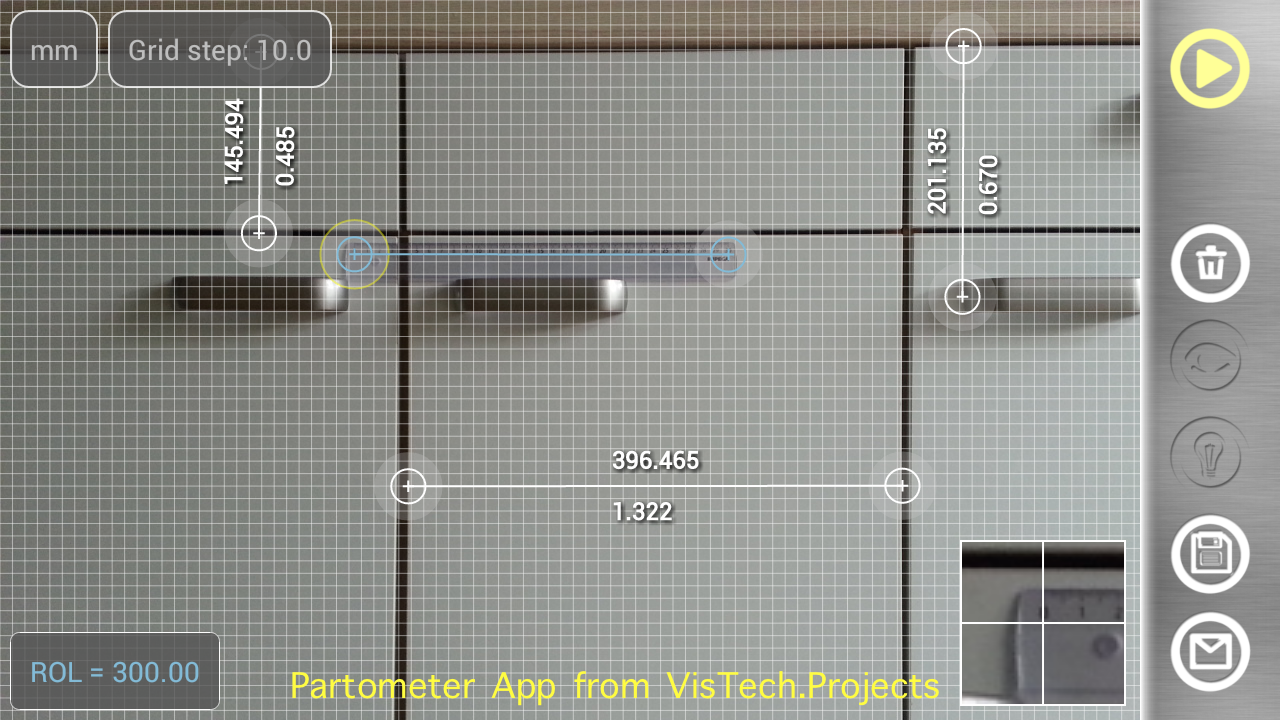
Partometer - your camera tape measure. Calibrate once, measure as many as you want.


Once calibrated using known object, Partometer App   allows you to do multiple measurements in the plane. Measurement plane has to be parallel to the camera. Measurement results can be shown in different units along with relative (to a reference) values. It helps to divide the object in certain ratio. If an object doesn’t fit into camera view you can take a picture from a side and use Partometer3D App that extends functionality of Partometer to any defined plane in 3D.

Partometer Android app on Google Play