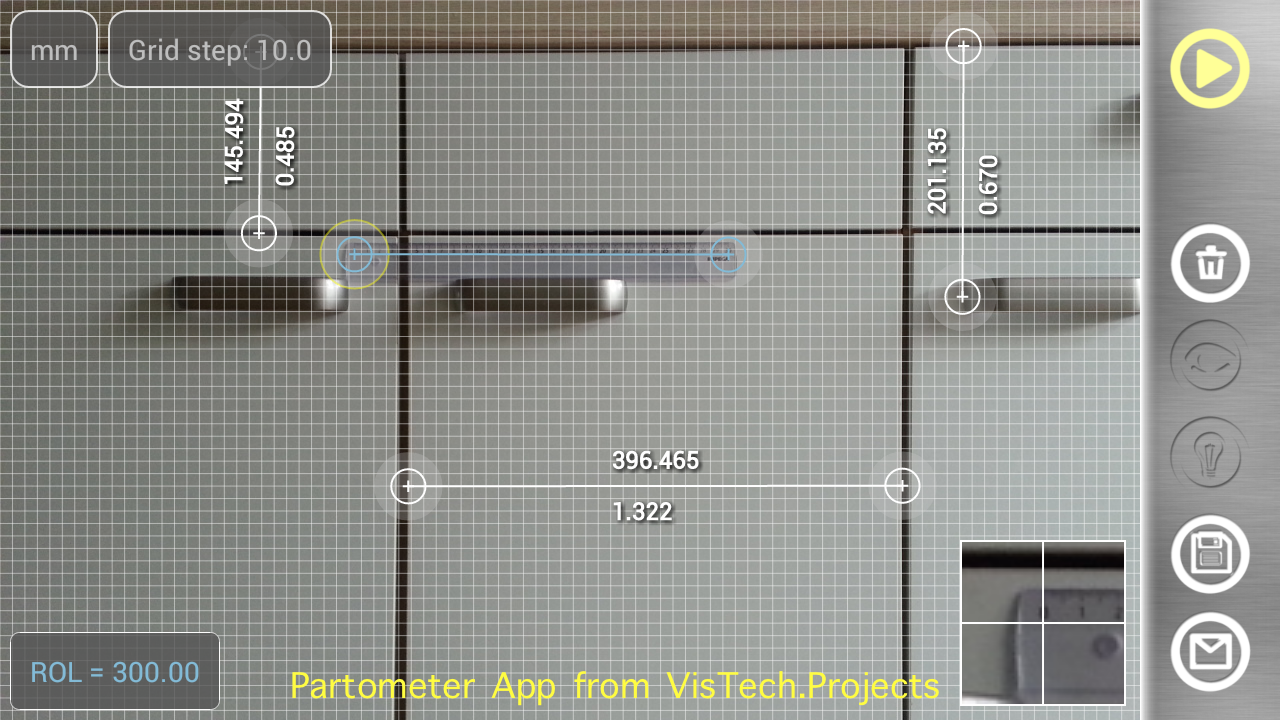
Once calibrated using known object, Partometer App allows you to do multiple measurements in the plane. Measurement plane has to be parallel to the camera. Measurement results can be shown in different units along with relative (to a reference) values. It helps to divide the object in certain ratio. If an object doesn’t fit into camera view you can take a picture from a side and use Partometer3D App that extends functionality of Partometer to any defined plane in 3D.
Translate
Tuesday, September 2, 2014
Monday, August 25, 2014
Our Android MapTrack app has been used during a trip around the US for six months now.
MapTrack is an Android app for recording and sharing tracks in real time. One of MapTrack users (Brian) has been using it during his trip around the US for last 6 months.
He has embedded Track Viewer from the app into his blog.
If you are interested in tracking and measurements on maps please check also our Planimeter app.
No comments:
Labels:
Android,
GPS,
MapTrack,
real-time location sharing,
tracking
Saturday, August 9, 2014
Friday, August 8, 2014
Laser Distance Meter - camera measure. Measure distances with camera on Android phone or tablet.
LaserDistanceMeter is a camera measure tool for quick estimation of distances and length. You can use any reference object with known size for measurements. Laser Distance Meter has also automatic mode where you can make a measurement with only one click!
Any android camera device, phone or tablet, can be used for measurements. Just follow the procedure to calibrate your device and you are ready to measure distances to any object with your camera.
Using standard objects like a car, window, golf flag, human height, etc. as a reference you can measure distances - just select Custom option and enter the object size.
LaserDistanceMeter has a list of commonly used reference objects like credit card, Letter or A4 sheet, coins, DVD disk, etc.
The App shows measurement results in different units: meters, millimeters, centimeters, feet, inches based on user settings.
There is an option to make a picture or load a picture from gallery, Zoom View feature helps to align object boundaries accurately.
Features:
- measure distance to known size objects
- automatic measurement mode
- different measurement units
- list of predefined reference objects
- ability to define any custom object as a reference object
- ability to calibrate any android camera to use for measurements
- quick calibration with predefined standard objects.
This app can be useful for outdoor and sport activities: golf, hiking, traveling, etc., where quick estimation of distances is needed. It also can be used for measurements in a room or small objects measurements.
Using Custom option you can make measurements in wide range depending on a reference size: from mm to km, from inches to miles.
Wednesday, August 6, 2014
Saturday, August 2, 2014
Partometer3D - camera measure. Measurements with your camera on photos in any defined plane in 3D.
Partometer3D is a handy tool for object dimensions measurements. It can be used as a ruler or tape measure, or remote measurement device.
This app allows user to make measurements in defined plane in 3D . The measurement plane / object plane does not have to be parallel to the camera plane. It expands number of situations where application can be used. For example, big objects now can be measured by taking a picture at some angle (from a side), objects and distances that are difficult to reach can be measured as well.
The app has following important and distinctive features:
- measure in any selected plane in 3D space
- add/delete any number of measurement lines/rulers
- values assigned to each ruler line
- measure objects in different directions
- save and share you measurement
- find object ratios, if you don't not need absolute measurements
- compare object parts to each other
- use custom and predefined reference objects
- automatic reference object fine alignment using image processing
Partometer3D uses a phone/tablet camera and any available object with known size as a reference to perform measurement. To define the measurement plane a rectangular object (e.g. sheet of paper, credit card, custom object) is used. Image processing is used for automatic edge alignment with the reference object.
The app shows measurement results in different units: meters, millimeters, centimeters, feet, inches based on user settings. It also calculate dimensions of the object in relative units with respect to the reference object (ROL).
There is an option to make a picture and work with the still image instead of live camera view. Picture Load feature is also implemented to work with any picture from your photo gallery. Zoom View feature helps to align object boundaries accurately. Partomter3D can be very useful if you need to measure dimensions, where a simple ruler or measure tape is difficult to apply.
Friday, August 1, 2014
Converter4U - instant unit conversion. Review from iSenaCode.
The review is in Spanish , but here is a translated conclusion:
“Pros :)
+ Simple and intuitive design.
+ Lots of features all in one.
+ Fluency and speed conversion automatically.
+ Is free and includes no advertising banners.
Cons :(
- It is only available in English.
- Maybe the interface has become somewhat outdated.”
Please see the full review:
http://www.isenacode.net/2014/07/converter4u-conversor-de-unidades-de.html
No comments:
Labels:
Android,
converter4u,
iOS,
unit converter
Subscribe to:
Posts (Atom)